
How to Make an Overhead Camera Mount for Filming Tutorials (DIY for $15)
Learn how to make a DIY overhead camera mount for filming tutorials. Easy $15 setup perfect for knitting, crafts, and videos.
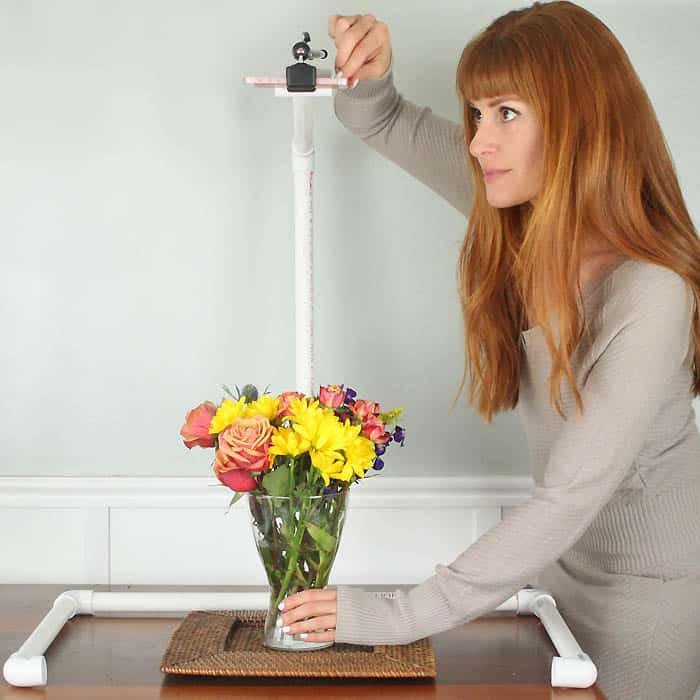
If you create DIY tutorials, knitting videos, sewing projects, or recipe content, having a reliable overhead filming setup can completely transform the quality of your content. Overhead shots are one of the most popular ways to film step-by-step tutorials because they clearly show your hands and the project from a clean, distraction-free angle.
The good news is that you don’t need expensive equipment to achieve this professional look. In this guide, I’ll show you exactly how to make an overhead camera mount DIY for just $15 using simple materials you may already have at home.
This setup is perfect for bloggers, YouTubers, Etsy sellers, and anyone creating hands-on content like knitting patterns, crochet tutorials, sewing projects, or craft demonstrations. It’s sturdy, easy to assemble, and completely beginner-friendly.
If you’ve been looking for an affordable way to upgrade your content creation setup, this is one of the easiest and most budget-friendly solutions you can make.
Why Use an Overhead Camera Mount?
Overhead filming is ideal for tutorial-style content because it provides a clear, top-down view of your workspace. This makes it easier for viewers to follow along step-by-step without distractions.
Whether you’re filming a flat knit hat pattern, demonstrating how to sew kids’ shorts, or showing a simple crochet technique, an overhead camera angle keeps the focus exactly where it should be—on your hands and your project.
Here are a few reasons why an overhead camera mount is worth making:
- Creates clean, professional-looking videos
- Perfect for step-by-step tutorials
- Keeps your workspace organized and visible
- Works for phones, cameras, or lightweight equipment
- Budget-friendly alternative to expensive mounts
If you’re building out your content for platforms like your blog, YouTube, or even Instagram Reels, this setup will quickly become one of your most-used tools.
Overhead Camera Mount DIY for $15
Supplies for Overhead Camera Mount DIY
PVC pipe (2, 5 foot lengths)
PVC connectors (5 elbow, 2 “T”)
Flat head screw
Drill
Super glue
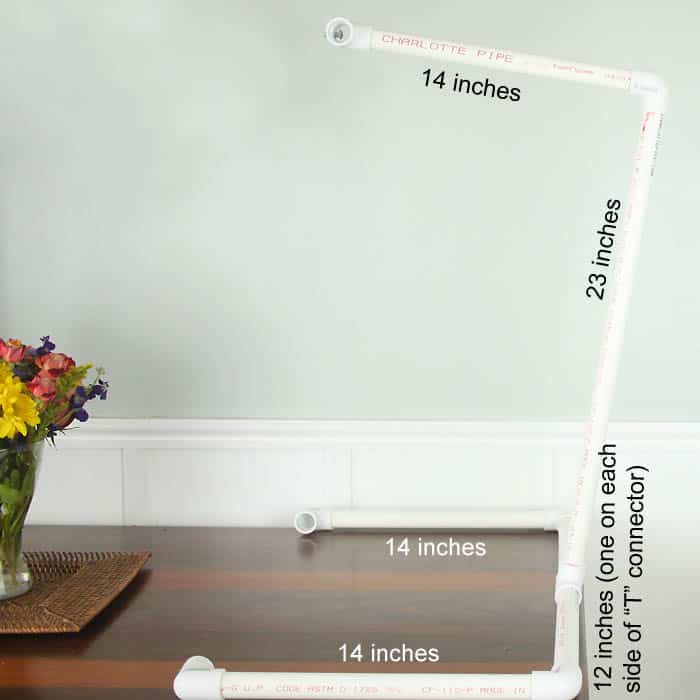
Cut the pipe into the following length:
3- 14 inch sections
2- 12 inch sections
1- 23 inch section
(some of the big home improvement stores will cut the pipe for you, otherwise you can use a hand saw or miter saw)

Join the pipes together, using the connectors as pictured. I super glued the corners of the stand so they would be extra secure.
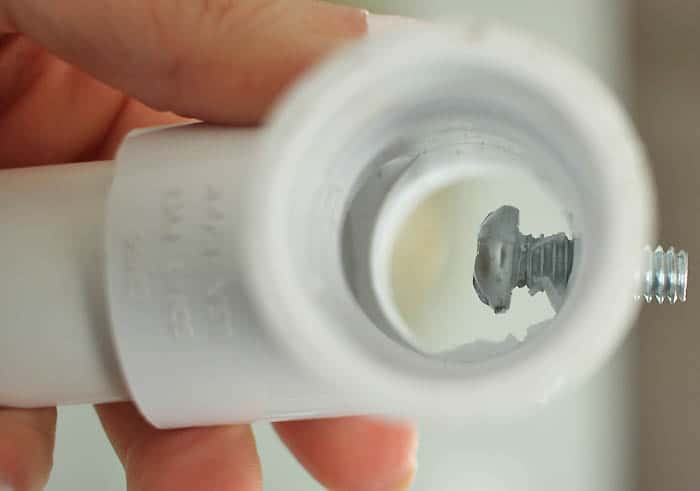
To attach the camera: Drill a pilot hole through the “T” connector. Using your fingers, twist the screw through the hole from inside the connector.
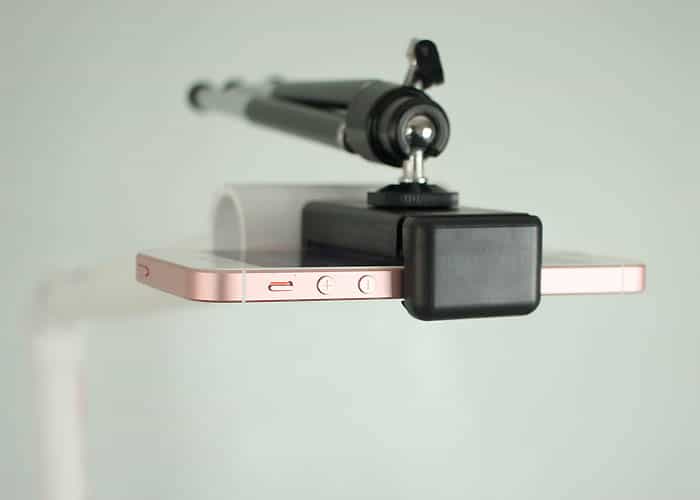
This camera mount can easily accommodate a cell phone camera as well! All you need is a mini tripod (I bought this one from Amazon). It comes with a hole that you can screw to the camera mount.
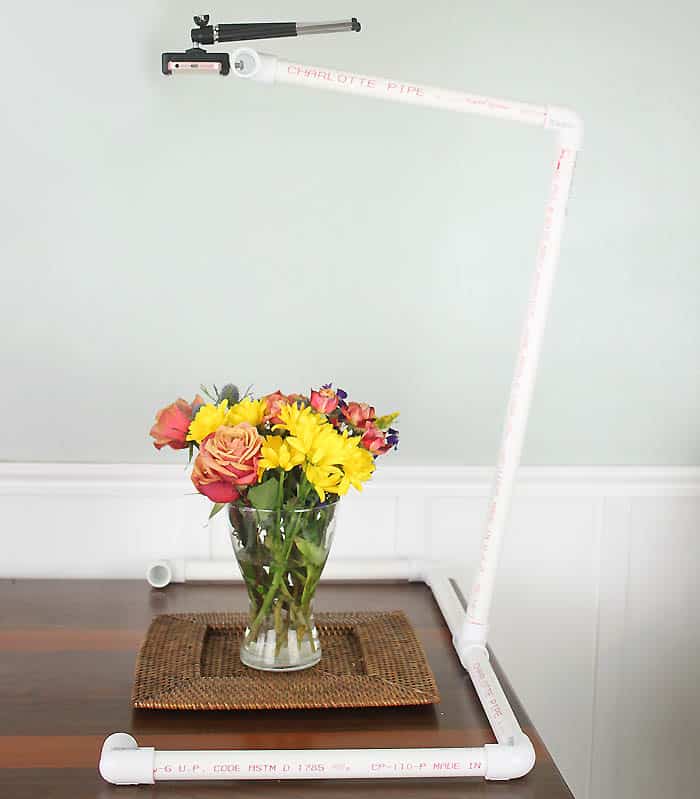
You’re going to want to angle the “T” connector at the base of the stand slightly back so the camera is positioned directly overhead.
Tips for Filming Better Overhead Videos
Once your overhead camera mount is set up, a few small adjustments can make a big difference in your final video quality.
Lighting is one of the most important factors. Natural light works beautifully, especially if you can film near a window. If needed, add a simple ring light or softbox to reduce shadows.
Keep your background clean and neutral so your project stands out. This is especially important if you’re filming detailed work like knitting stitches or sewing seams.
You may also want to use a contrasting surface so your materials are easy to see. For example, light yarn on a darker background or vice versa.
If you regularly create tutorials, this setup pairs perfectly with projects like:
- Beginner knitting guides
- Easy sewing tutorials
- Crochet step-by-step patterns
- DIY home decor projects
How This Setup Helps Grow Your Website and Business
If you’re creating content for your site or Etsy shop, improving your visuals can directly impact your traffic and income.
High-quality tutorial images and videos increase:
- Time on page
- Engagement
- Social shares
- Conversions
For example, if you’re selling knitting patterns, showing clear overhead steps makes your patterns easier to follow and more appealing to buyers.
Budget vs. Professional Camera Mounts
You might be wondering how this $15 DIY version compares to professional equipment.
While professional overhead mounts can cost $100 or more, this DIY version provides a very similar result for a fraction of the price.
The biggest advantages of this DIY setup are:
- Extremely affordable
- Customizable to your space
- Lightweight and portable
- Easy to repair or adjust
If you’re just starting out or want to keep costs low, this is an excellent alternative.
Common Mistakes to Avoid
When building your overhead camera mount, there are a few things to watch out for.
One of the most common issues is instability. If your base isn’t heavy enough, your setup may wobble while filming. Always choose a sturdy base.
Another mistake is placing the camera too high or too low. Test different heights to find the best angle for your content.
Poor lighting can also affect your results. Even with a great camera setup, bad lighting can make your videos look dull or unclear.
Frequently Asked Questions
What is an overhead camera mount and why do I need one?
An overhead camera mount is a setup that holds your camera or phone directly above your workspace so you can film from a top-down perspective. This angle is especially useful for tutorials because it allows viewers to clearly see your hands and each step of the process without distractions. If you create content such as knitting patterns, sewing tutorials, crochet projects, or DIY crafts, an overhead view makes your instructions easier to follow and more engaging. It also gives your content a clean, professional look that can help build trust with your audience.
Can I really build an overhead camera mount for only $15?
Yes, it is absolutely possible to build a functional overhead camera mount for around $15 using simple and affordable materials. Items like a wooden base, PVC pipe or a dowel, and a basic phone holder are inexpensive and widely available. The total cost may vary slightly depending on what you already have at home, but this DIY version is dramatically cheaper than store-bought options. Many professional overhead mounts can cost over $100, making this a great budget-friendly alternative for beginners and content creators.
Is this DIY camera mount stable enough for filming videos?
This setup can be very stable when it is built correctly. The key is to use a strong and heavy base so the mount does not tip over while filming. If you notice any movement or wobbling, you can improve stability by tightening all connections, reinforcing joints, or adding weight to the base. When assembled properly, this DIY mount is more than stable enough for filming tutorials, step-by-step guides, and overhead videos.
What kind of camera works best with this setup?
You can use a wide range of devices with this overhead camera mount, including smartphones, DSLR cameras, mirrorless cameras, and compact cameras. Smartphones are often the easiest and most convenient option, especially for beginners, because they are lightweight and capable of recording high-quality video. If you already own a camera, you can easily adapt this setup with a standard tripod mount attachment.
How do I attach my phone or camera to the mount?
To attach your device, you will need a clamp or mount that connects to the end of the horizontal arm. For smartphones, a simple adjustable phone holder works perfectly and can be secured tightly in place. For cameras, you will need a tripod adapter with a standard screw mount. It is important to make sure everything is securely tightened before you begin filming to prevent any movement or slipping.
What is the best height for an overhead camera?
The ideal height depends on the type of content you are creating. For detailed work such as knitting stitches or sewing seams, a closer camera position will allow viewers to see finer details more clearly. For larger projects or full workspace views, placing the camera higher will give a better overall perspective. A good starting point is around 12 to 24 inches above your work surface, and then you can adjust based on what looks best on camera.
How can I improve lighting for overhead videos?
Lighting plays a major role in how your videos turn out. Natural light is one of the best options, especially if you can film near a window during the day. If natural light is not available, you can use simple lighting solutions like a ring light, softbox, or even a desk lamp. The goal is to create even lighting that reduces shadows and makes your project easy to see. Positioning lights on both sides of your workspace can help create a balanced and professional look.
What background should I use for filming tutorials?
A clean and simple background works best for overhead videos. Neutral colors like white, beige, or light wood help keep the focus on your project. It is also helpful to choose a background that contrasts with your materials so everything is easy to see. For example, lighter yarn will stand out better on a darker surface, while darker materials look best on a lighter background. Keeping your workspace uncluttered will also improve the overall appearance of your videos.
Can I use this setup for photography as well?
Yes, this overhead mount works just as well for photography as it does for video. It is ideal for taking flat lay photos, step-by-step tutorial images, and product shots for your blog or shop. Consistent overhead photos can make your content look more polished and cohesive, which is especially important if you are sharing tutorials or selling digital products like patterns.
How do I stop the camera from shaking while filming?
To prevent camera shake, it is important to make sure your base is sturdy and all connections are secure. Avoid touching the setup while filming, as even small movements can cause shaking. Using a timer or remote shutter can help reduce movement when starting your recording. If you are using a smartphone, enabling built-in stabilization features can also improve the overall smoothness of your video.
Is this better than using a tripod?
A standard tripod is useful for many types of filming, but it is not always ideal for overhead shots. Most tripods are not designed to extend directly over your workspace without getting in the way. An overhead camera mount is specifically designed for top-down filming, making it a much better choice for tutorials and hands-on content where visibility is important.
Can I customize this DIY camera mount?
One of the biggest advantages of this setup is how easy it is to customize. You can adjust the height, change the length of the horizontal arm, or even add additional attachments for lighting or accessories. You can also paint or finish the base to match your workspace. This flexibility makes it easy to adapt the setup as your content needs evolve.
What types of content is this setup best for?
This overhead camera mount is ideal for any type of content that involves working with your hands. It is especially useful for knitting tutorials, crochet projects, sewing demonstrations, DIY crafts, recipe videos, and step-by-step guides. The top-down angle makes it easier for viewers to follow along and understand each step.
How can this help grow my webiste or business?
Improving your visuals can have a direct impact on your web traffic and income. High-quality photos and videos keep visitors on your page longer, increase engagement, and make your content more shareable. If you sell patterns or digital products, clear overhead tutorials can make your content more appealing and easier to follow, which can lead to higher conversions and more sales.
Do I need any special tools to build this?
You do not need advanced tools to complete this project. A screwdriver or drill is usually enough to assemble the mount. If you do not have access to tools, you can use strong adhesive or pre-assembled components. This project is beginner-friendly and can be completed quickly with minimal effort.
✨ I’d love to see what you’re making! ✨
If you’ve tried one of my knitting patterns, crochet projects, DIYs, or recipes, share your finished project on Instagram and tag me so I can see it 💛
There’s nothing better than seeing your creations come to life—from cozy knits to delicious recipes and everything in between. It truly makes my day!
Tag me @ginamicheleny so I can share your work and cheer you on!
Happy making!
this is genius, love it. Thanks for the idea
Such a smart idea! Shooting overhead is challenging and the arm attachment for a tripod is expensive. How much did you spend on all the supplies for this?
So sorry just noticed the price was in your title!
What a smart idea! But it seems like it would be too light for a real camera, wouldn't it? I think my DSLR would instantly tip it over. Maybe it could be adapted for metal pipe? I might have to try that, because I have the same problem with not having a good way to shoot overhead shots and video. Thanks for the inspiration!
Hi Rachel- I made the camera mount to use (mainly) with my DSLR. I attached my phone to the mount for the blog pics because I wanted to use the better camera to photograph everything. I promise it doesn't tip over! The based is wide and it makes up for the weight of the camera.
Can I ask what specific camera you have? Some are significantly heavier than others, as I learned when I upgraded my old Nikon to a much bigger, heavier one. I'd like to compare the weight to mine before I try to build one of these.
Good point- I didn't think of that. I use a Canon T5i.
Thank you!
Fantastic idea!